The AI medical scribe that understands how Indian doctors actually talk
Consult in Hindi, Tamil, Bengali or English, or a mix of them in one sentence. Medabha listens, drafts the SOAP note and suggested medicines, and you decide what reaches the chart.
- 22 Indian languages plus English, detected automatically
- SOAP note and suggested medicines drafted for you
- You apply the draft, so the chart is never auto-written
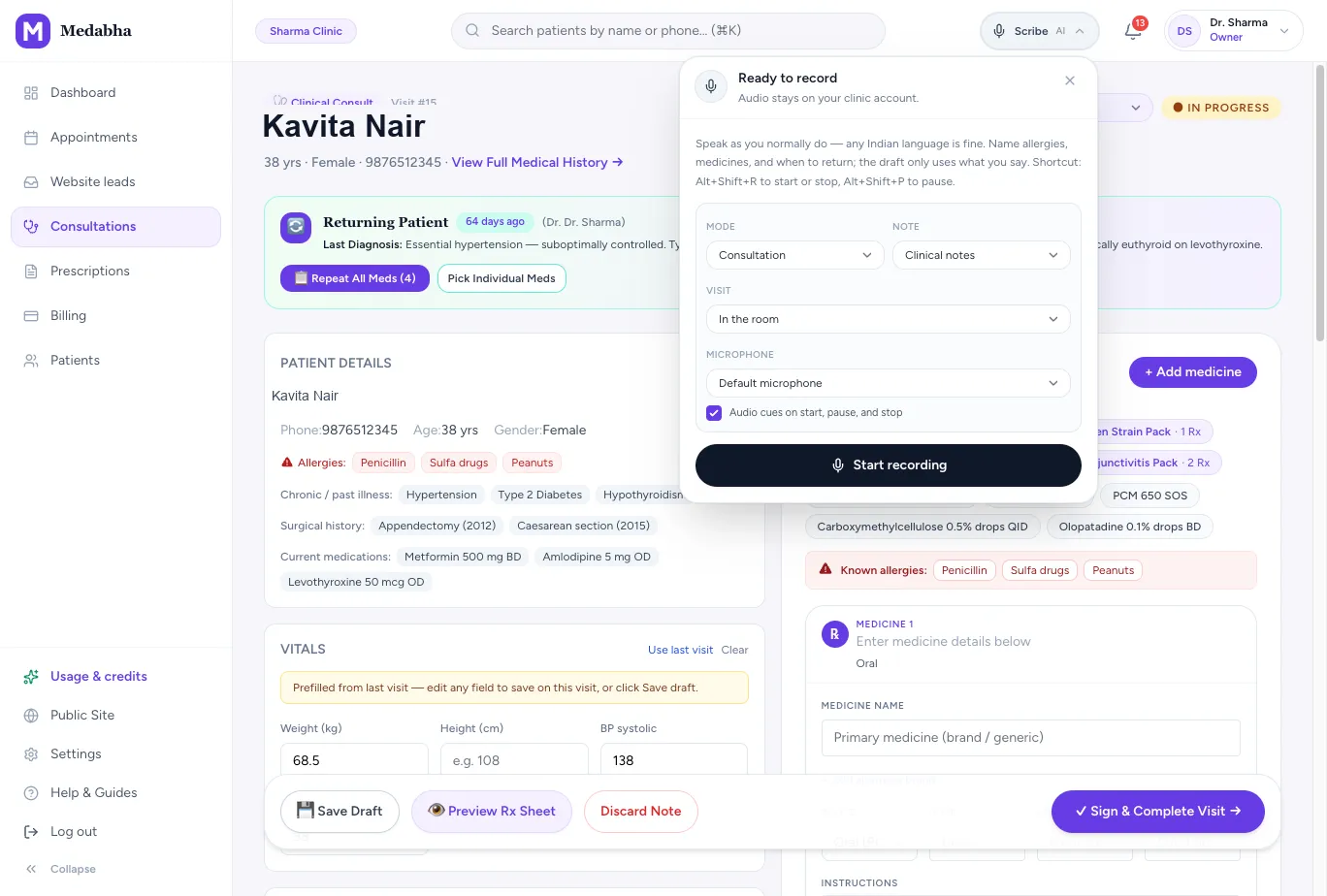
One visit, start to finish
Built for Indian consultations
Most consultations in India move between languages, and the room is rarely quiet. Medabha is a multilingual AI medical scribe built for that.
22 Indian languages plus English
The scribe understands all 22 scheduled Indian languages and English, and writes the draft as clinical English you can read and edit.
Auto by default, Hindi if you prefer
Nothing to choose before each visit. The language is detected automatically, or you can set your usual consultation language, such as Hindi, once in Settings.
Mixed-language speech
Doctors and patients switch languages mid-sentence. Hindi and English in one line is normal, and the draft still reads as one note.
Two speakers, kept apart
Transcripts separate doctor and patient, so the note reflects who said what.
Silence is skipped
The microphone only records while someone is talking, so long gaps are not sent for transcription.
Create a scribe account and record your first Hindi consultation
Most OPDs in North and Central India run in Hindi, Hinglish or a local language with English medicine names. Here is what setting up the scribe for that looks like, from signup to a signed note.
1. Sign up with your mobile number
Open the signup page and enter your name, a 10-digit Indian mobile number, email, specialty, city and a password. The clinic name is optional. You get a 14-day free trial with no card, and each mobile number can open one clinic.
2. Choose Hindi, or leave it on Auto
In Settings → AI note templates, set Consultation language to Hindi if most of your patients speak Hindi or Hinglish. Leave it on Auto if your language changes from patient to patient. Mixing in English is fine either way.
3. Tell the patient, then start recording
Open the patient's consultation, tap Scribe, pick Consultation or Dictation and press Start recording. On a phone, a small recording bar stays on screen while you examine.
4. Speak the way you normally do
Hindi, English or both in one sentence. The transcript keeps Hindi words in Devanagari and English words, like most drug names, in English.
5. Read the English draft against what was said
The note is drafted in clinical English. Medicine names are kept as spoken, and words the scribe could not make out are marked [check]. Tap "Read full transcript" under the draft to compare it with what was said.
6. Apply only what you agree with
Nothing reaches the chart until you apply the draft, adjust doses and sign. The screens themselves are in English; Hindi is for what is said in the room.
Try the scribe for 10 seconds before you sign up
The homepage has a short demo. Speak one sentence and see the text that comes back, in your own language, without creating an account.
1. Open the demo on the homepage
Tap the record button and allow the microphone. The demo listens for 10 seconds.
2. Say one sentence the way you would in OPD
For example, "Fever and cough for two days." The box shows sample lines in English, Hindi, Bengali and Tamil. If you mix languages, you still get one paragraph.
3. Read the text and the language it heard
The demo stops at the transcript. It does not write a SOAP note or suggest medicines; that happens inside a consultation once you have an account.
The audio is not kept
It is a demo, not a medical record. Medabha deletes the audio as soon as the text comes back. Please do not say a real patient's name or details.
One try per browser
The demo is limited each day. If it is full, the free trial has the full scribe, with no card needed.
What it costs after that
The AI scribe is in every plan. The Free plan includes 20 AI scribe visits a month, each up to 10 minutes. Paid plans start at ₹799 a month with 100 scribe minutes.
Consultation or dictation
Pick how you want to work for each visit. The mode changes how the microphone is tuned and how the draft is written.
Consultation mode
Records the conversation between you and the patient in the room, and drafts the note from both sides of it.
Dictation mode
You speak the note yourself after the examination, like a voice note, with the microphone tuned for a single voice.
Video consults
Capture a video call with your microphone plus the call audio, using Chrome's share-tab-with-audio option.
Notes in your format
A SOAP note is the default, but every specialty and every doctor writes differently.
Custom note templates
Write instructions once, for example how a dental procedure note should read, and use them as your default or per visit.
A template directory
Start from ready formats in Settings → AI note templates → Directory, then Add to library. The catalogue includes Clinical notes (SOAP), Sick visit, New patient visit, Follow-up visit, Brief note, Prescription-focused, plus specialty cards such as Psychiatry visit, Cardiology OPD, Eye visit, ENT visit, Dental visit, Gynae OPD, ANC visit, Child fever / URTI, Skin lesion, Ortho follow-up, Diabetes / BP clinic and Wound / post-op. You can also generate a template from a short description or a pasted sample note, or write your own.
Learns your style
When you edit a draft and sign it, later drafts follow your brevity, bullets and abbreviations. You can turn this off.
Specialty-aware drafts
Drafts follow the chart specialty and the template you picked for that recording. An orthopaedic visit can use Ortho follow-up; a psychiatry or counselling follow-up can use Psychiatry visit (mood, sleep, risk only when you asked, medicine changes). The template instructions are snapshotted when recording starts, so changing the library later does not rewrite an old visit.
Long consults and therapy sessions
A single recording stops at 30 minutes. That is enough for most OPDs. For a longer psychiatry or counselling session, use dictation after the session, split into two recordings, or write a custom template and keep the spoken summary inside the cap. Silence is already skipped, so waiting-room gaps do not use the allowance the same way speech does. On the Free plan each scribe visit is also limited to 10 minutes.
Recordings and advice clips
The scribe feeds the rest of the consultation, so the work does not stop at the note.
A recording library
Every visit keeps its recording, duration, language and transcript, playable from the patient chart.
Advice clips for the family
Record a short spoken advice clip in the family's language and send it with the prescription on WhatsApp.
Draft again from saved audio
If a draft fails, the reason stays on the record, and you can retry from the saved audio.
You stay in control of the chart
An AI draft is decision support. The prescriber remains responsible, and the product is built around that.
Nothing is auto-written
The draft waits until you apply it. Patient details, vitals, SOAP notes and prescription suggestions each go in only when you say so.
Suggested medicines are suggestions
Draft prescription lines are matched to the medicine catalog. Add single ones from the chips, or press Apply to bring them all into the prescription form, then delete any you do not want.
Edit before you sign
Review the note in the same consult screen, change what is wrong, then sign and complete the visit.
Voice to prescription: what the scribe does with medicines
Say the medicine, strength, dose, how often and for how long, the way you would to the patient. Here is what happens to those words.
Each medicine becomes a line
The draft lists every medicine you named, with route, dose, frequency, duration and instructions as separate fields, so you are not reading a paragraph.
Doses are copied, not guessed
Strengths, doses, frequencies and durations are kept as spoken. If you name a medicine without a dose, the line is listed with that field left empty. The scribe is told never to swap one medicine for another or fill in a dose you did not say.
Only medicines you actually discussed
Medicines are drafted only when they were explicitly talked about in the visit. The scribe does not choose a treatment for you.
Nothing is signed for you
Apply brings the lines into the prescription form, or you add single ones from the chips. Check the dose, frequency and duration on every line and delete what you do not want before you sign.
A prescription-first template
For quick OPD visits, pick the Prescription-focused template. It keeps the SOAP note short and puts the effort into capturing every medicine.
What it does not do
Allergy warnings appear when you sign, and a short list of common interacting pairs is checked while you prescribe and again on signing. There is no complete drug-interaction database, so the dose check and the final prescription are yours.
Review, then apply: what each step does
The draft sits beside the consult form until you act on it. Here is exactly what happens at each step.
1. Read the draft against the transcript
Tap "Read full transcript" under the draft and check the note line by line against what was said.
2. Discard if the recording is not usable
Discard removes the recording and any AI draft. Nothing from it is applied to the consult.
3. Apply the draft to the note
"Apply draft to note" works once the recording has finished and a draft is ready. It fills in the consult form on your screen. It does not save or sign the visit, and you can still change every field.
4. Stored allergies, conditions and medicines are a separate step
Changing what is saved on the patient's record is its own step. It shows exactly what would change before anything is written.
5. Sign to finish
Apply also brings the drafted medicine lines into the prescription. Correct doses and wording, delete any line you do not want, then sign and complete the visit.
Privacy of consult audio
A recording of a consultation is sensitive, so the rules are simple and written down.
No training on your consults
We do not use consult audio or notes to train foundation models.
No selling of data
We do not sell patient data. Under the DPDP Act your clinic is the data fiduciary and Medabha processes data on your instructions.
Recorded only when you press record
The app shows a recording indicator the whole time. Tell patients a scribe is in use and get their agreement.
Retention
Audio is kept after signing so you can play it back from the chart. Deleting it automatically on signing is not a per-clinic setting yet. If your clinic needs that, write to care@medabha.com.
How the AI medical scribe works
- 1
Talk
Start recording and consult as you normally do, in any language.
- 2
Draft
Medabha drafts the SOAP note and suggested medicines.
- 3
Review
Read the draft and edit anything that is wrong or missing.
- 4
Save
Apply what should go into the chart: notes, vitals, follow-up.
- 5
Prescription
Voice to prescription, with you in between: check each drafted medicine line, delete what you do not want, sign, and send the prescription on WhatsApp.
Typing after OPD, dictation or an ambient AI scribe
| Comparison | Typing after OPD | Dictation | Ambient AI scribe |
|---|---|---|---|
| When the note is written | Between patients or late at night | After the exam, spoken by you | While you talk to the patient |
| What the doctor does | Types everything | Speaks the whole note | Consults as usual, then reviews the draft |
| Patient's own words | From memory | Summarised by you | Captured from the conversation |
| Languages | Whatever you type in | Usually English | 22 Indian languages plus English, mixed freely |
| Who decides what is saved | You | You | You, by applying the draft |
What to know before you rely on it
- It drafts documentation. It does not diagnose or make clinical decisions.
- Accuracy depends on audio quality. A noisy room or several people talking at once lowers it, so check doses and numbers every time.
- Audio is uploaded in short segments and drafted by a background job, so it needs an internet connection.
- Medabha is in early access. Keep your own independent records while you evaluate it.
Frequently asked questions
What is a medical scribe?
A medical scribe writes up the consultation so the doctor can focus on the patient. Traditionally that is a person in the room. An AI medical scribe listens to the consultation and drafts the note for the doctor to review and sign.
Is an AI medical scribe accurate?
Treat it as a fast first draft, not a finished record. Accuracy drops with background noise, several people speaking at once or unclear speech, so review every note and confirm doses, durations and dates before you sign. Our guide to how AI medical scribes work explains where they help and where they fail.
Does it work with Hindi and English mixed?
Yes. Switching between Hindi and English, or any of the 22 scheduled Indian languages, within one consultation or one sentence is expected. The language is detected automatically unless you set a consultation language in Settings, and the draft is written in English.
Can I set Hindi as my consultation language?
Yes. Go to Settings → AI note templates and set Consultation language to Hindi. It stays on Auto until you change it, and Auto is the better choice if you switch languages between patients. Speaking English words in between is fine with either setting.
Will the note come out in Hindi?
No. The clinical note is always drafted in English so it reads the same for any doctor. What was said is kept separately as a transcript ("Read full transcript" under the draft), with Hindi in Devanagari and English words in English, so you can check medicine names and anything marked [check] before you sign. There is also a page about it in Hindi.
Does it handle Bengali and English mixed consults?
Yes. Bengali is one of the languages you can pick in Settings, and Auto also picks it up. The transcript keeps Bengali words in Bengali script and English words, like most drug names, in English. The note is drafted in English. Read the transcript and anything marked [check] before you sign. There is also a page about it in Bengali.
Which consultation languages can I pick in Settings?
Assamese, Bengali, Gujarati, Hindi, Kannada, Malayalam, Marathi, Odia, Punjabi, Tamil, Telugu, Urdu and English. If your language is not on that list, leave the setting on Auto. Auto sends the recording without a language, and our speech-to-text provider, Sarvam, detects it across the 22 scheduled Indian languages plus English.
Does it learn the language my clinic usually consults in?
Yes, when you leave it on Auto. Once most of your clinic's recent recordings are detected in one language, later recordings tell the speech-to-text that language up front, which helps on short clips. Every fifth recording goes back to full auto-detect, so if your clinic changes language, the scribe notices.
Is patient audio safe?
Audio is uploaded over an encrypted connection, encrypted on our server's disk as soon as it is saved, stored against the consultation in your clinic's account, and never used to train models or sold. It is kept after signing so you can play it back. Our security page explains who can access it and what happens if you leave.
Does the scribe replace the doctor or write the record by itself?
No. It drafts a note and suggested medicines. Nothing is written to the patient chart until the doctor applies the draft, and the prescriber stays responsible for what is signed.
Do I need my patient's consent to record?
You should tell patients a scribe is in use and get their agreement, and offer to pause it for sensitive moments. Our guide to how AI medical scribes work includes a sample consent line.
Can it turn the consultation into a prescription?
Partly, and on purpose. The scribe drafts medicine lines from what was said, matched to the Indian medicine catalog. Apply brings them into the prescription form, or you can add single ones from the suggestion chips. You check each dose, delete what you do not want, see any allergy warning and sign. Your voice gets you a draft; the prescription is still yours. More on our prescription software page.
Can I use it as a clinical note taker for voice notes?
Yes. Dictation mode records only your voice, so you can speak a note after the examination or between patients and get a structured draft back. It becomes part of the patient's EMR record once you apply it.
Is there a free trial?
Yes. Every new clinic starts with a 14-day free trial and no credit card. After it, a Free plan stays free: 100 visits a month, with the AI scribe on 20 of them (up to 10 minutes each). Paid plans are listed on the pricing page, from ₹799 a month.
Can it draft notes for psychiatry or counselling visits?
Yes, as a draft you still review. Add the Psychiatry visit card from Settings → AI note templates → Directory, or write your own counselling template. That shape asks the draft for mood, sleep, appetite, energy and anxiety in the words that were spoken, and for self-harm or harm-to-others risk only when you asked. It will not invent a mental-state exam. Long therapy hours still hit the recording limit, so many clinicians dictate a short summary after the session. The doctor remains responsible for what is signed.
How long can one recording be?
One recording is capped at about 30 minutes. On the Free plan, each of the 20 monthly scribe visits is also limited to 10 minutes. For a longer session, stop and start a second recording, use dictation for a short summary, or finish the note from your template without ambient audio. Medabha is early-access documentation support; it does not replace your clinical record-keeping for complex psychiatric care.
Can I try the AI scribe before signing up?
Yes. The homepage has a 10-second demo: speak one sentence and you get the transcript and the language it heard. It does not write a note, and Medabha deletes the audio as soon as the text comes back. It allows one try per browser. For the full scribe, the free trial needs no card.
What happens when I press Apply?
Apply fills in the consult form on your screen from the draft. It does not save or sign the visit, and you can edit every field. Changes to the patient's stored allergies, conditions or medicines are a separate step that shows what would change first. If a recording is not usable, Discard removes it and its draft.
Keep exploring
EMR software
OPD EMR software for Indian doctors: structured charts, a visit timeline, ABHA on the record, a Hindi and 22-language AI scribe and WhatsApp prescriptions.
Learn morePrescription software
Prescription software for Indian doctors: create a prescription from a medicine catalog, check allergies, sign and print it on your letterhead.
Learn moreClinic management software
Clinic management software for Indian clinics: appointments, walk-in queue, UPI billing, AI-drafted notes and prescriptions on WhatsApp. 14-day free trial.
Learn moreDigital prescription software
Digital prescription software for doctors: sign once and send the prescription on WhatsApp with your letterhead and an advice clip. No patient app.
Learn moreBengali AI medical scribe
Bengali AI medical scribe: বাংলায় বা বাংলা-ইংরেজি মিশিয়ে রোগী দেখুন। Medabha ইংরেজিতে SOAP নোটের খসড়া করে দেয়, আপনি দেখে নিয়ে Apply করেন। Free plan আছে।
Learn moreHindi AI medical scribe
Create a scribe account in Hindi: हिंदी या हिंग्लिश में मरीज़ देखें। Medabha अंग्रेज़ी में SOAP नोट का ड्राफ़्ट बनाता है। आप Apply करते हैं।
Learn moreSee it for your specialty
Read the guides behind this
These guides split the job: how AI medical scribes work is the pipeline; AI medical scribe for Indian doctors is the buying scorecard. This page is the Medabha product.
AI Medical Scribe for Indian Doctors: What to Check Before Buying
What Indian OPD and chamber clinics should test before they buy: languages, WhatsApp prescriptions, honest limits, and a trial on their own audio.
14 min readAI in ClinicsHow AI Medical Scribes Work: From Conversation to Clinical Note
An AI medical scribe listens to your consultation and drafts the note for you to review. Here is what happens behind the scenes, and where it can go wrong.
10 min readAI in ClinicsHow Doctors Can Save Time Using AI Documentation
Documentation quietly eats hours every week. Here is where the time goes, how AI documentation gives it back, and how to measure the difference in your own clinic.
7 min readBuying GuidesBest Clinic Management Software for Small Clinics in India (2026): How to Choose
There is no single best clinic software. There is the best fit for your specialty, team and budget. Here is how to shortlist and decide.
9 min readBuying GuidesENT Clinic Software in India: A Practical Buying Guide for ENT OPDs
What ENT clinic software should record, how it differs from general clinic software, OPD vs ENT EMR vs hospital systems, endoscopy and audiogram questions, Rx printing and a buyer checklist.
9 min readBuying GuidesBest Dermatology Software in India (2026): A Shortlist for Skin Clinics
An honest shortlist of dermatology software in India: Medabha for a solo skin OPD, plus Clinicea, HealthPlix, Practo Ray, DermaAI and Clinemo, and what to test for photos and lasers.
11 min readBuying GuidesGynaecology Clinic Software in India: A Buying Guide for OBG OPDs
What gynaecology clinic software should record in an Indian OBG OPD: pelvic exam maps, ANC notes, menstrual and AUB care, USG questions, Rx on WhatsApp, pricing and a buyer checklist.
8 min readComplianceNHA ambient AI voice scribe and PM-JAY claims: what clinics should know
NHA ambient AI voice scribe: what the Kolkata review meeting demonstrated, how that sits next to auto-adjudication of PM-JAY claims, and what the Voice-to-Text EoI does and does not start for a private clinic.
15 min readCompliancePatient consent before an AI scribe records a consultation: a script and checklist for Indian clinics
Patient consent for AI scribe recording, in plain steps: what to tell the patient, a short script you can read out, what the DPDP Act and the medical ethics regulations say, what to do for children and for patients who say no, and what to ask your scribe vendor.
15 min readSee it on your own workflow
Start the 14-day free trial. After it, the Free plan stays free: 100 visits a month, no card. Or book a short walkthrough with your own patients in mind.