CLINIC MANAGEMENT SOFTWARE
Clinic management software for Indian clinics, from front desk to prescription
Run today's clinic in one system: appointments and a walk-in queue at the desk, AI-drafted notes in the consult room, the prescription on WhatsApp afterwards, and fees collected by UPI.
- Appointments, tokens and a walk-in queue
- AI-drafted notes and prescriptions on WhatsApp
- UPI billing with no per-appointment commission
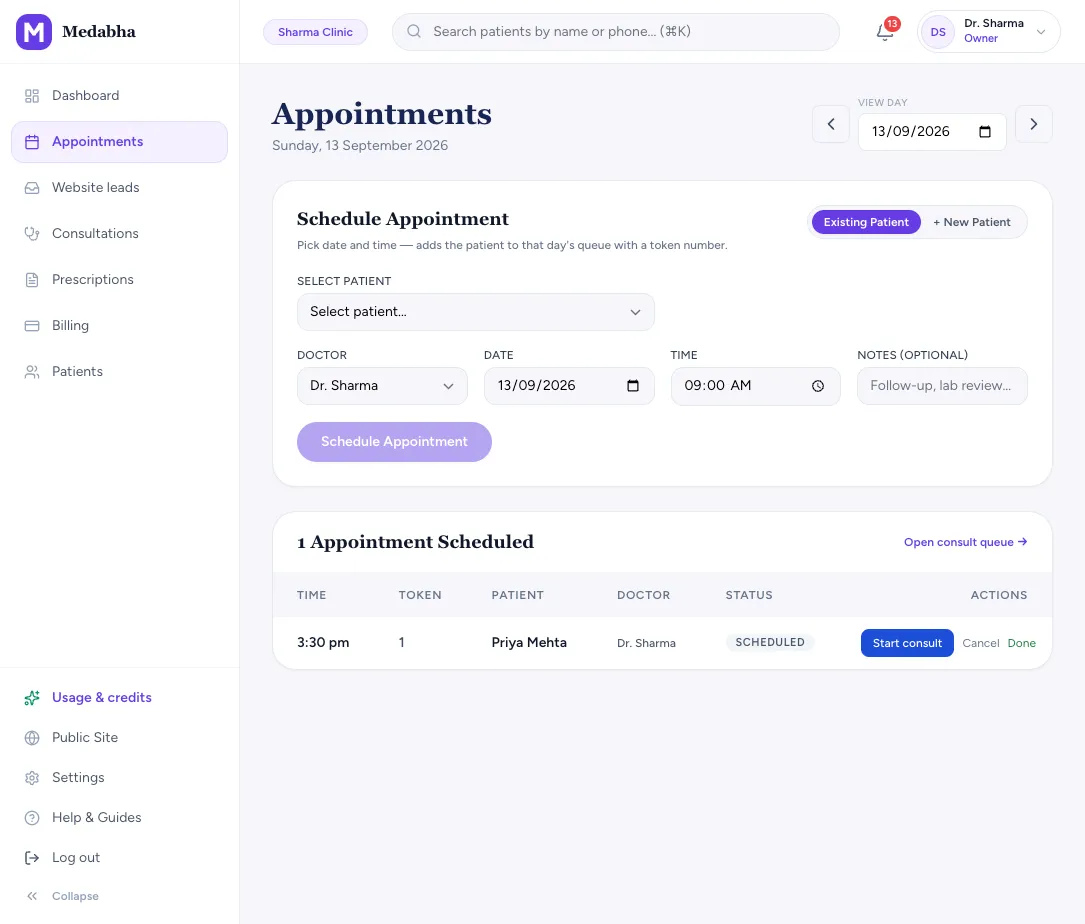
The front desk: appointments, tokens and the walk-in queue
Good software for clinic management starts before the consultation, with knowing who is coming and in what order.
Appointments with tokens
Pick a patient, a date and a time. The appointment gets a token number in that day's queue.
Walk-ins without paperwork
Add a walk-in with a name and phone number and send them straight to the consult.
A receptionist login
A receptionist can register patients and run the queue without opening clinical notes, billing or settings.
Chambers and hours
Set one or more chambers with their own weekly hours. Bookable slots and the hours on your website come from the same place.
Colour tags
New, Follow-up, OT and Old tags show on the queue and the chart, so the type of visit is clear at a glance.
Quick book from the dashboard
Book a follow-up for an existing or new patient without leaving the dashboard.
The consult room: notes, charts and safer prescriptions
The doctor opens the chart from the queue, and the patient's history is already on screen.
An AI scribe that drafts the note
Consult in any of 22 Indian languages or English. The scribe drafts the SOAP note and suggested medicines, and nothing reaches the chart until you apply it.
Specialty charts
Charts for dental, eye, ENT, orthopedics, dermatology, gynecology, pediatrics, urology and surgery, with last visit's marks shown faintly underneath.
Allergy warnings
Known allergies show beside the prescription. A matching drug, by name or common drug class, is flagged as you add it and again on sign.
History without page-hopping
Allergies, conditions, current medicines and past visits sit in the consult screen and save as you type.
After the visit: prescriptions, reminders and refills
Most lost follow-ups are communication problems, so the visit does not end when the patient leaves the room.
Picture Rx on WhatsApp
Sign the visit and the prescription can go to the patient on WhatsApp as a picture with your letterhead. Patients install nothing.
Spoken advice for the family
Add a short advice clip in the family's language, sent with the prescription.
Follow-up reminders
Appointment and follow-up reminders go out on WhatsApp, with a second nudge a few hours before the visit. Nothing is sent before 7 am.
1-click refills
Repeat a returning patient's last prescription and change only what is different.
Billing and payments
Fees belong with the visit, so end-of-day totals are not a separate exercise.
Fees on the visit
Set your usual consultation fee and add items per visit.
Paid and unpaid at a glance
See paid and unpaid invoices, mark cash payments and view the amount outstanding on the dashboard.
UPI and Razorpay
Collect by your clinic UPI ID, or connect your own Razorpay account for verified online payments.
No commission
One software fee for the clinic. No per-appointment commission and no listing fee.
Your own clinic website
Patients who search for you should find your clinic, not a list of other doctors.
A branded site
Publish a site with your services, chambers and hours.
Real online booking
Patients pick an open slot, verify their number with a WhatsApp code, and the visit lands on your calendar.
Enquiries until booking is on
Before you set hours, the site takes an enquiry form instead, and the patient gets a receipt.
Patient data and the DPDP Act
Clinics are accountable for patient records, so the roles are stated plainly.
Your clinic is the data fiduciary
The DPDP Act makes your clinic the data fiduciary for patient records. Medabha is the processor and acts only on your instructions.
Not sold, not used for training
We do not sell patient data, and we do not use consult audio or notes to train foundation models.
Free to leave
The owner can download patient and visit records from Settings, and can delete the whole clinic, with its data, from there.
How a visit runs through the clinic management system
- 1
Book or walk in
Through your website, by phone or at the desk.
- 2
Token and queue
The patient joins the day's queue with a token number.
- 3
Consult
The doctor opens the chart from the queue while the scribe drafts the note.
- 4
Prescribe and send
Sign the visit and send the prescription on WhatsApp.
- 5
Collect and follow up
Record the fee by cash or UPI, and a reminder goes out before the review date.
Paper, Excel, a marketplace app or one clinic management system
| Comparison | Paper registers | Excel and chat apps | Marketplace apps | Medabha |
|---|---|---|---|---|
| Appointments | A diary | A sheet or a calendar | Booked through the app's listing | Built in, with tokens and a walk-in queue |
| Patient records | A file per patient | Scattered across sheets and phones | Held by the platform | One chart per patient, owned by your clinic |
| Prescriptions | Handwritten | Typed or photographed | Inside the app | Signed, on your letterhead, sent on WhatsApp |
| Billing | A cash book | A separate sheet | Varies | Fees on the visit, with UPI |
| Cost model | Free but slow | Free but slow | Often a commission or listing fee | One software fee, no commission |
| Your patients | Yours | Yours | Shown alongside other doctors | Yours, and never advertised to |
What it is not
- It is built for one doctor per clinic with an optional receptionist, not for multi-doctor groups or hospitals with wards.
- Locations are chambers where a doctor sees patients, not a multi-branch chain.
- GST line-item invoicing is not built yet.
- Reception can register patients and run the queue. Billing and settings stay with the owner.
- Medabha is in early access. Keep your own independent records while you evaluate it.
Frequently asked questions
What is a clinic management system?
A clinic management system is software that runs the daily work of an outpatient clinic: appointments and the patient queue, patient records, prescriptions, billing and reminders. Medabha keeps all of these on the same patient chart, so the front desk and the consult room work from one record.
What is the best software for clinic management in India?
There is no single best choice. It depends on your specialty, whether you have front-desk staff, how many doctors work in the clinic, and your budget. Shortlist two or three tools, try each on a real OPD day and compare the total cost, including AI and messaging usage. Our guide to choosing clinic management software for small clinics has a checklist. Medabha fits one doctor per clinic with an optional receptionist; a multi-doctor group or a hospital needs a different kind of system.
How much does clinic management software cost in India?
Pricing models vary: a monthly subscription, a one-time licence or a commission on each appointment. Medabha charges a fixed clinic fee, monthly or annual, with AI scribe and WhatsApp usage metered, and no commission on appointments. Public list prices are paused while we onboard clinics, so book a short demo and we will share the plan for your clinic.
Can I use it for a single-doctor clinic?
Yes. Medabha is built for one doctor per clinic, with an optional receptionist login and hours for more than one chamber. Our doctor software page shows how a solo practice uses it day to day.
Can patients book appointments online?
Yes. Once you set your locations and hours, your clinic website shows real open slots. Patients verify their phone number with a WhatsApp code and the booking lands on your calendar. Until then the website takes an enquiry form instead, and whoever fills it in gets a receipt by email or WhatsApp.
Does it send appointment reminders?
Yes. Appointment and follow-up reminders can be sent on WhatsApp, with a second one a few hours before the visit, depending on your plan and settings. If you cancel or move a visit, the patient is told as well.
Can a receptionist use it?
Yes. A receptionist gets a separate login that can register walk-ins and run the queue but cannot open consultations, prescriptions, billing or settings.
Is this a hospital management system?
No. It is outpatient clinic software with no inpatient wards, beds or pharmacy stock.
How is clinic management different from practice management?
Clinic management runs today's clinic: the queue, the consultation, the prescription, the bill and the reminder. Practice management is about understanding the clinic as a business: growth, returning patients, no-shows, revenue and who has access. Our medical practice management page covers that side.
Keep exploring
Medical practice management software
Practice management software to run your clinic as a business: patient growth, returns, no-shows, revenue, outstanding fees and who has access.
Learn moreDoctor software
Doctor chamber software for a solo practice: fast consults, AI-drafted notes, WhatsApp prescriptions, billing and a clinic website.
Learn moreAI medical scribe
Ambient AI medical scribe that understands Hindi, Bengali, Tamil and other Indian languages, even mixed with English. Drafts SOAP notes for you to review.
Learn moreSee it for your specialty
Read the guides behind this
Plain-language articles that explain the ideas on this page in more depth.
Best EMR Software in India (2026): An Honest Shortlist for OPD Clinics
The main types of EMR and clinic software used in Indian OPDs, the well-known names in each, and which one fits a solo GP, a specialist, a group practice or a hospital.
6 min readBuying GuidesBest Clinic Management Software for Small Clinics in India (2026): How to Choose
There is no single best clinic software. There is the best fit for your specialty, team and budget. Here is how to shortlist and decide.
6 min readAI in ClinicsHow AI Medical Scribes Work: From Conversation to Clinical Note
An AI medical scribe listens to your consultation and drafts the note for you to review. Here is what happens behind the scenes, and where it can go wrong.
7 min readGuidesClinic Website for Doctors: What Your Patients Actually Need
A clinic website for doctors does not need to be fancy. Here is what patients look for, what to skip, and how to keep it honest and easy to update.
7 min readComplianceDPDP Act for Clinics: What Indian Doctors Need to Do Before 2027
India's data protection rules are now notified, and every clinic that stores patient details digitally is covered. Here is what changed, what it means for a small practice, and a practical checklist.
6 min readSee it on your own workflow
Start the 14-day free trial, or book a short walkthrough with your own patients in mind.