Dental clinic software built for Indian dental practices
Chart every tooth on an FDI chart, let the AI scribe draft the note between procedures, and send after-care instructions to the patient on WhatsApp.
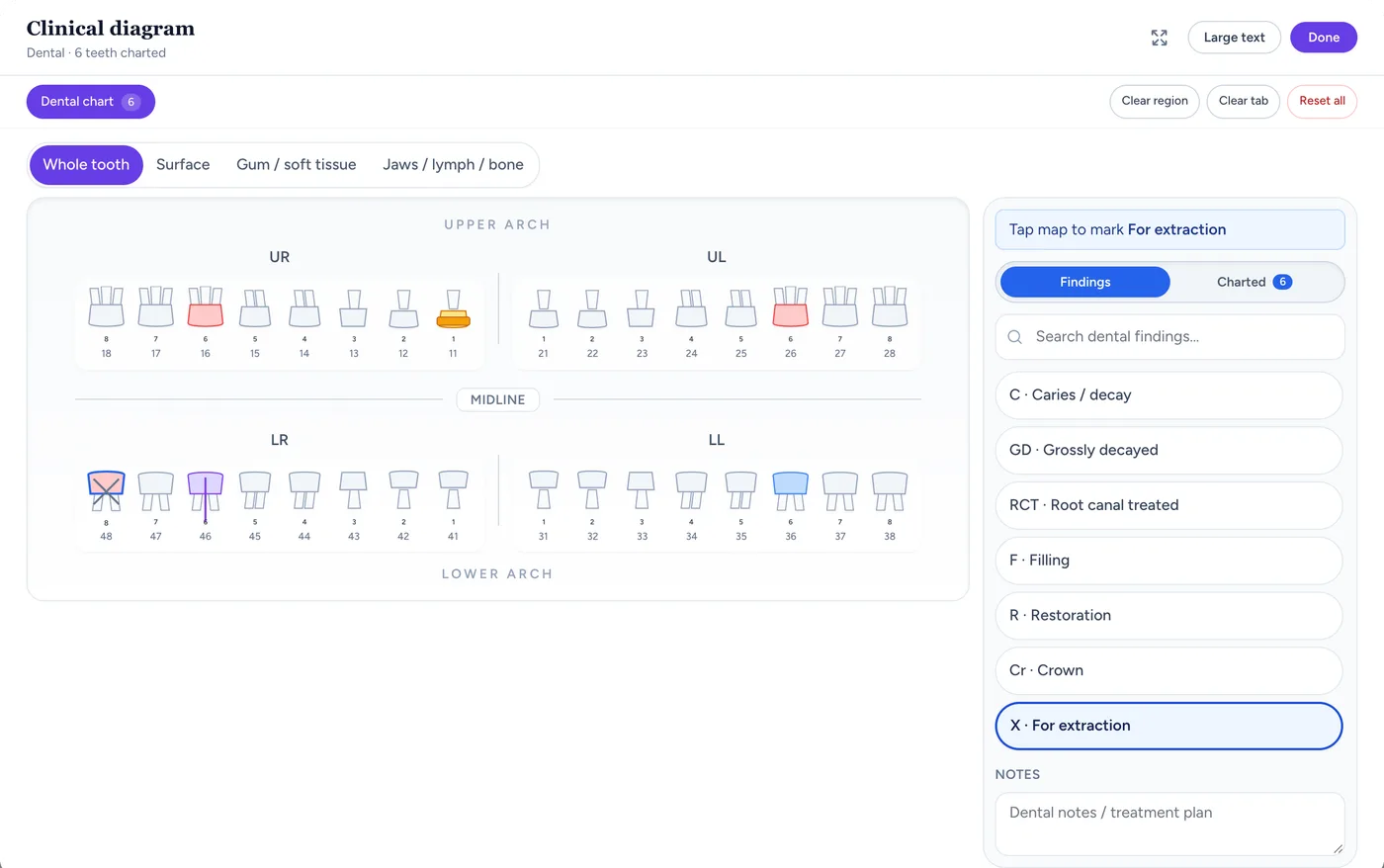
The FDI tooth chart
Chart caries, fillings, root canals, crowns and extractions tooth by tooth on the FDI chart.Screen from the Medabha consult room, shown with demo data.Dental charting on an FDI tooth chart
Mark findings tooth by tooth instead of writing a paragraph, and see what was there at the last sitting.
FDI numbering with Palmer labels
Every adult tooth from 11 to 48, with Palmer notation shown alongside, and findings by surface: mesial, occlusal, distal, buccal and lingual.
Tooth conditions
Caries, fillings and restorations, root canal treated, crowns, implants, missing, impacted and teeth marked for extraction.
Gums and oral mucosa
Gingivitis, bleeding on probing, recession, periodontal pockets, mobility and bone loss, plus ulcers and white or red patches.
Ghost of the last sitting
The previous visit's marks show faintly on the chart, so you can see what has changed since the last sitting.
Notes by voice, between procedures
Talk through the findings while you work. The ambient AI scribe drafts the note, and you review it before it reaches the chart.
A dental note template
Add the built-in Dental OPD template, or write your own "Dental procedure note" format once and make it your default.
Teeth named correctly
The draft uses FDI numbers and works from the arch, side and tooth you describe, not a bare number, so a spoken "upper right six" lands on 16.
Charted from the conversation
Findings the scribe hears can be suggested on the tooth chart too. Nothing is applied until you accept it.
After-care instructions on WhatsApp
Patients forget post-procedure instructions by the time they reach home. Send them in writing and in your voice.
Picture Rx
Sign the visit and the prescription goes to the patient on WhatsApp as a picture with your letterhead, medicines and advice.
Advice clips in their language
Record a short clip in Bengali, Hindi, Tamil or any language the patient speaks, for example what to do after an extraction, and send it with the prescription.
No app for the patient
Patients open the prescription and the clip in their phone's browser.
Multi-sitting treatment and follow-ups
Root canals, scaling and restorations often take more than one visit. Each sitting is a visit on the same patient record.
Every sitting on one timeline
Each sitting keeps its own chart, notes and prescription, and past sittings are one tap away on the patient record.
Follow-up reminders
Set the next sitting as a follow-up date and a reminder goes out on WhatsApp before it.
Patients book themselves
Your clinic website shows real open slots, so patients can book the next sitting without calling.
Billing for each sitting
Fees are recorded against the visit, so every sitting has its own bill.
Fee items per sitting
Add the consultation and procedure fees for that sitting, and see what is paid and what is outstanding.
UPI and online payment
Collect by your clinic UPI ID, or connect your own Razorpay account.
No commission
One software fee for the clinic, with no commission on appointments.
A website for your dental clinic
Publish a site with your services, chambers and hours, so patients who search for you can book directly.
Your services and hours
List treatments, chambers and timings, kept in sync with the slots patients can book.
Online booking
Patients verify their number with a WhatsApp code and the visit lands on your calendar.
Built for the Dental exam
An FDI tooth chart (11–48) with Palmer labels and tooth surfaces, a gum and oral mucosa map, and an extra-oral map for swelling, lymph nodes, trismus and jaw deviation.
One-click problem packs
Pre-fills common findings and medicines for dental visits. You review and edit before signing — nothing reaches the chart unapproved.
Why dental clinics use Medabha
Tooth-level charting, not a free-text note
Mark caries, restorations and teeth marked for extraction against individual teeth on the FDI chart, and attach the chart to the prescription.
After-care patients can replay
Share the Picture Rx and a short advice clip on WhatsApp so patients have the instructions between sittings.
Faster notes between patients
Dictate findings between chair-side procedures and let the ambient scribe draft the note while you move to the next step.
Dental clinic software questions
What is the best dental clinic software in India?
It depends on how your practice works: the number of chairs and dentists, whether you have front-desk staff, and whether you need tooth charting, prescriptions, reminders and billing in one place. Try two or three options on a real clinic day before you decide. Medabha fits a dentist who wants FDI charting, AI-drafted notes and WhatsApp prescriptions in one system, with one dentist per clinic and an optional receptionist.
Does it support dental charting?
Yes. There is an FDI tooth chart for teeth 11 to 48 with Palmer labels and tooth surfaces, a gum and oral mucosa map, and an extra-oral map. The previous visit's marks show faintly underneath so you can compare sittings.
Can I send post-treatment instructions to patients?
Yes. Sign the visit and send the prescription on WhatsApp as a picture, with an optional spoken advice clip in the patient's language, for example instructions after an extraction. Patients open both in their phone's browser.
Is it suitable for a single-chair clinic?
Yes. Medabha is built for one dentist per clinic with an optional receptionist login, which suits a single-chair or small practice. It is not designed for a multi-dentist group or a chain of clinics.
Can I track treatment across multiple sittings?
Each sitting is recorded as a visit with its own chart, notes and prescription, and you can review past sittings from the patient record. There is no separate treatment-plan or cost-estimate module today.
Other specialties on Medabha
Ready to see Medabha for dental?
Book a 15-minute walkthrough with your own cases in mind, or start the 14-day free trial.
Explore Medabha by what you need
Each page covers one part of running a clinic, with what it does and what it does not.
Guides for clinics
Plain-language reads on EMR software, prescriptions and AI documentation.
How AI Medical Scribes Work: From Conversation to Clinical Note
An AI medical scribe listens to your consultation and drafts the note for you to review. Here is what happens behind the scenes, and where it can go wrong.
7 min readGuidesHow to Create a Digital Prescription (and Share It on WhatsApp)
A digital prescription is faster to write, easier for patients to read and simple to keep. Here is what it must contain and how to send one in minutes.
6 min readBuying GuidesBest Clinic Management Software for Small Clinics in India (2026): How to Choose
There is no single best clinic software. There is the best fit for your specialty, team and budget. Here is how to shortlist and decide.
6 min read