PRESCRIPTION SOFTWARE
Prescription software for doctors: create, print and send prescriptions online
Online prescription software that prints on your letterhead. Search an Indian medicine catalog, add a problem pack in one tap, repeat last time's prescription, check allergies, then sign and print.
- Indian OPD medicine catalog with brand aliases
- One-tap problem packs and 1-click refills
- Allergy flag as you add a drug, by name or drug class, and again on sign
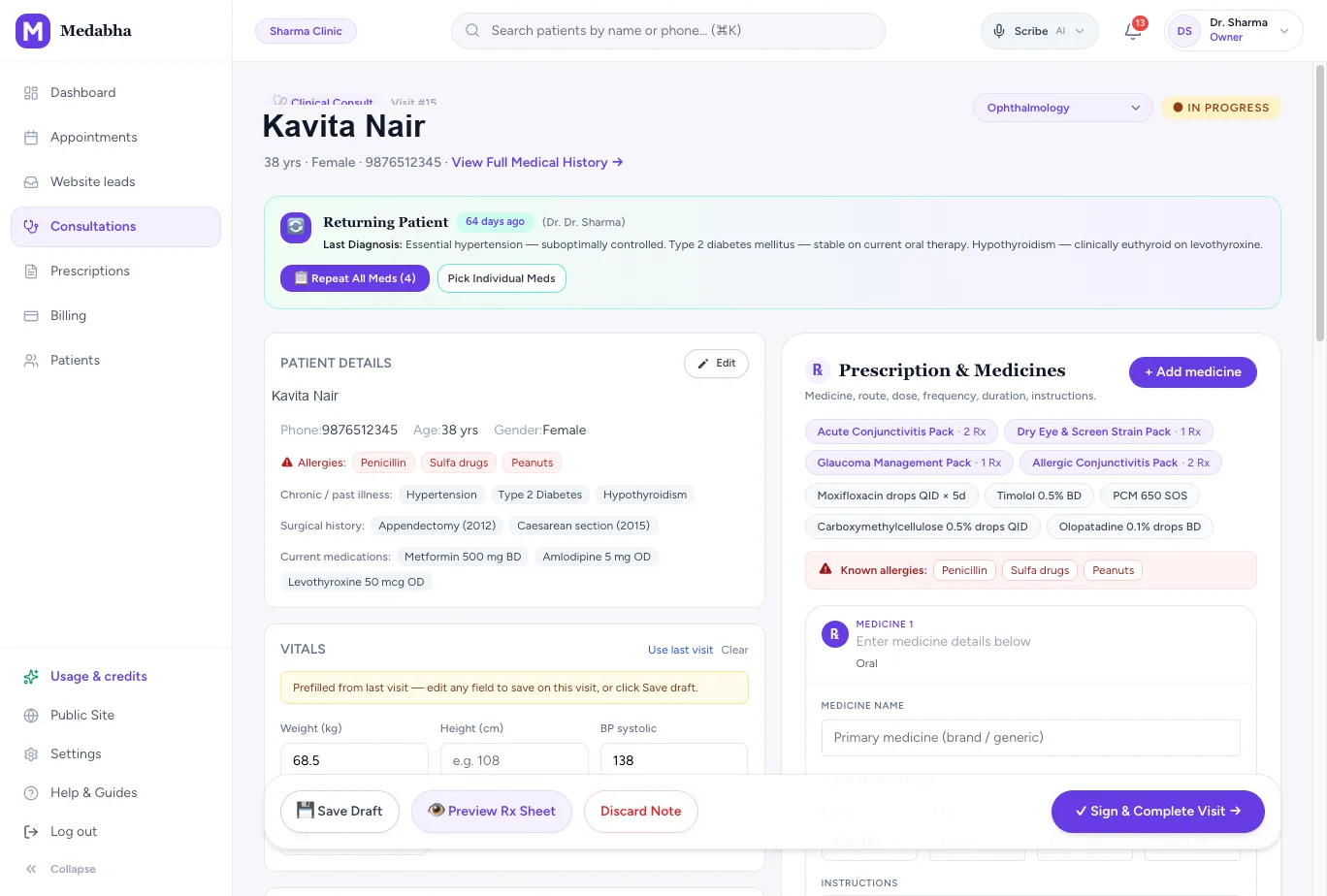
Write faster without typing everything
Most prescriptions repeat, so the software is built to reuse what you already prescribe.
A medicine catalog you can search
Type a few letters and pick from Indian brands and generics. Suggestions are ranked by what your clinic prescribes, and verified entries are marked.
Problem packs
Add a full bundle for fever, a cold, gastroenteritis or a chronic condition in one tap, then adjust the lines.
1-click refills
Repeat a returning patient's previous prescription and edit only what has changed.
Your frequent medicines
Chips for the medicines you use most sit above the prescription for quick adds.
Right route for the medicine
Creams, drops and sprays are marked topical, ophthalmic, nasal or otic, so they do not print as oral.
A complete prescription, not just a list
A prescription carries more than medicine names.
Dose, frequency and duration
Each line has route, dose, frequency, duration and instructions, with duration presets you can edit.
Advice and follow-up
Write advice for the patient, add a follow-up date and include investigations you want done.
Your letterhead
Add your name, qualification, registration number and clinic details once and they print on every prescription.
A4 or A5
Choose the paper size once. Margins stay adjustable when you print on a pre-printed pad.
Your signature on the page
Draw your signature once. It prints on the prescription, the PDF and the WhatsApp copy. Completing the visit is what locks the prescription. The drawing is an image of your usual signature, not a government digital-signature certificate.
Preview before you sign
Check the prescription sheet before you sign and complete the visit.
A safer prescription
Software cannot replace clinical judgement, but it can keep the important facts in front of you.
Flagged as you add a drug
A known allergy shows as a red banner beside the medicine lines. Add a matching drug and it is flagged straight away, by name or by common drug class (amoxicillin against a penicillin allergy, for example).
Checked again on sign
The same check runs when you sign, before the prescription goes out. It is a warning only; you decide.
Current medicines on the chart
Current medications are recorded on the patient, so you can see what they already take.
Nothing prints unsigned
The prescription is final only when you sign the visit, so a draft never reaches the patient by mistake.
Create, edit, check, sign and print
- 1
Create
Search the catalog, tap a problem pack or repeat the last prescription.
- 2
Edit
Adjust dose, frequency and duration, and add advice, tests and a follow-up date.
- 3
Check
Allergy flags and the preview sheet show before anything is final.
- 4
Sign
Sign and complete the visit to lock the prescription.
- 5
Print
Print it on A4 or A5, on your letterhead, or download the PDF.
Handwritten, a word-processor template and prescription software
| Comparison | Handwritten | Word or PDF template | Medabha |
|---|---|---|---|
| Speed for repeat patients | Rewrite every time | Copy and edit by hand | Repeat the last prescription in one click |
| Medicine names | From memory | Typed in full | Searched from a catalog with brand aliases |
| Legibility | Depends on handwriting | Always clear | Always clear |
| Record of the prescription | A carbon copy, if any | A folder of files | Saved on the patient chart |
What it does not do yet
- Allergy checks match by name or common drug class. A short list of common GP drug pairs (such as clopidogrel with a PPI, or an NSAID when kidney disease or hypertension is on the chart) is checked as you prescribe and again on sign. It is not a complete interaction database, and the prescriber remains responsible.
- The drawn signature is an image of your usual signature on the page. It is not a government digital-signature certificate, and prescription rules differ by state and by consultation type. Check current guidance from the regulator for your practice.
Frequently asked questions
Does the software check drug interactions?
Known allergies are checked as you add each drug, by name and by common drug class, and again on sign. A short list of common GP pairs is checked the same way — clopidogrel with a PPI, an NSAID with an anticoagulant or with kidney disease or hypertension on the chart, and a few others. It is not a complete interaction database. The prescriber remains responsible.
Can I use my own letterhead and registration number?
Yes. Add them once in settings and they appear on every prescription sheet.
Can I save my common prescriptions?
Yes. Problem packs and Smart Click snippets let you save a bundle of medicines, advice and findings for a condition, and 1-click refills repeat a patient's last prescription.
Which medicines are in the catalog?
A formulary of common Indian OPD medicines across cardiovascular, endocrine, gastrointestinal and other areas, with brand aliases. You can also type a medicine that is not listed.
Can I print or download the prescription?
Yes. Print the signed prescription on your letterhead, or download it as a PDF from the prescriptions list.
Can I send the prescription to the patient on WhatsApp?
Yes. After you sign, the same prescription can go to the patient on WhatsApp as a picture. Our digital prescription software page explains how sending works.
Keep exploring
Digital prescription software
Digital prescription software for doctors: sign once and send the prescription on WhatsApp with your letterhead and an advice clip. No patient app.
Learn moreEMR software
What EMR software is and what an outpatient EMR should do: structured patient charts, a visit timeline, specialty diagrams and AI-drafted notes.
Learn moreAI medical scribe
Ambient AI medical scribe that understands Hindi, Bengali, Tamil and other Indian languages, even mixed with English. Drafts SOAP notes for you to review.
Learn moreSee it for your specialty
Read the guides behind this
Plain-language articles that explain the ideas on this page in more depth.
Medical Prescription Printing Software: A Practical Guide for Indian Clinics
How to choose medical prescription printing software in India: letterhead layout, what the print must show, A4 vs A5, printers, bilingual advice and WhatsApp copies.
9 min readGuidesHow to Create a Digital Prescription (and Share It on WhatsApp)
A digital prescription is faster to write, easier for patients to read and simple to keep. Here is what it must contain and how to send one in minutes.
6 min readBuying GuidesWhat Should an EMR Software Have? A 15-Point Checklist for Clinics
Feature lists are long and most of it will not matter. Use this checklist to judge whether an EMR will actually work in your OPD.
6 min readBuying GuidesEye Clinic Software in India: A Practical Buying Guide for Eye OPDs
How to choose eye clinic software for an Indian OPD: per-eye fields, VA, IOP, refraction, device integration, spectacle Rx printing, WhatsApp and a practical buyer checklist.
9 min readBuying GuidesENT Clinic Software in India: A Practical Buying Guide for ENT OPDs
What ENT clinic software should record, how it differs from general clinic software, OPD vs ENT EMR vs hospital systems, endoscopy and audiogram questions, Rx printing and a buyer checklist.
9 min readGuidesGlaucoma Follow-Up Records in a Small Eye OPD
What to record at each glaucoma follow-up in an Indian eye OPD: VA, IOP per eye, drops, maps and attachments, how to compare visits, and print or WhatsApp copies.
8 min readBuying GuidesBest Dermatology Software in India (2026): A Shortlist for Skin Clinics
An honest shortlist of dermatology software in India: Medabha for a solo skin OPD, plus Clinicea, HealthPlix, Practo Ray, DermaAI and Clinemo, and what to test for photos and lasers.
11 min readBuying GuidesGynaecology Clinic Software in India: A Buying Guide for OBG OPDs
What gynaecology clinic software should record in an Indian OBG OPD: pelvic exam maps, ANC notes, menstrual and AUB care, USG questions, Rx on WhatsApp, pricing and a buyer checklist.
8 min readSee it on your own workflow
Start the 14-day free trial, or book a short walkthrough with your own patients in mind.