EMR SOFTWARE
EMR software for clinics: what an outpatient EMR should record and do
EMR software is the electronic version of the patient chart. A good outpatient EMR keeps a structured record, shows every past visit on one timeline and is faster than paper, so it does not slow the consult.
- One timeline per patient across every visit
- Structured allergies, history and medicines, not just free text
- Ten specialty charts and notes drafted by an AI scribe
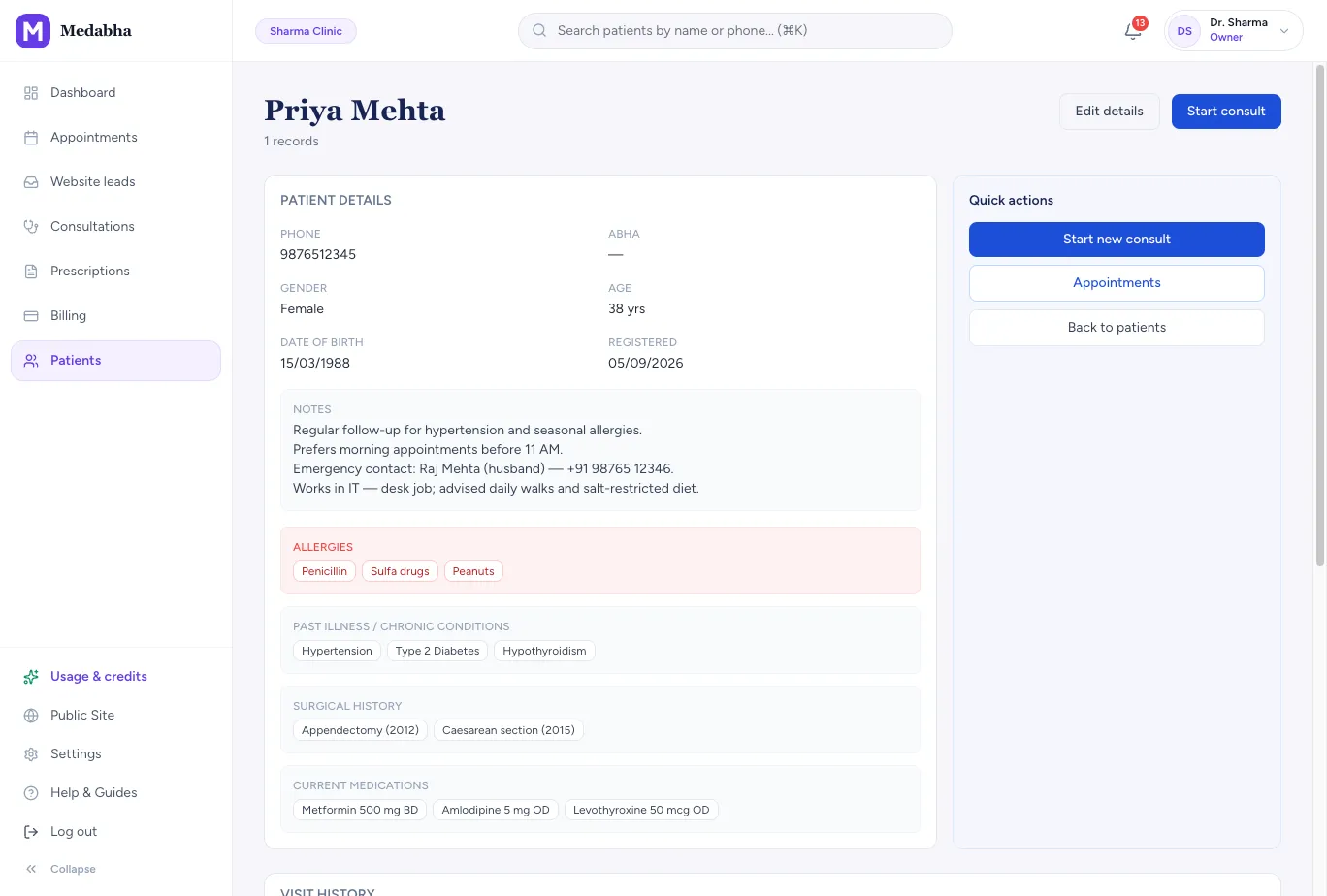
What an EMR should record
A useful EMR captures the same things a good paper chart would, in a form software can search and warn from.
Patient profile
Demographics, phone, date of birth or approximate age, and colour tags such as New, Follow-up and Old.
Medical background
Allergies, past illness, chronic conditions, surgical history and current medicines, each as searchable tags.
Visit notes and vitals
Weight, height and BP prefilled from the last visit when unchanged, plus SOAP or your own note templates.
Prescriptions and advice
Every prescription, its advice and its follow-up date stay on the visit and on the patient chart.
Investigations and reports
Order tests, upload lab reports and scans, and compare results across visits.
One timeline, not a stack of visits
The value of an EMR shows at the second visit, when everything you need is already on screen.
Visit history
All consultations for a patient, newest first, with vitals and a prescription summary.
Charts with a ghost of last time
Specialty diagrams show the previous visit's marks faintly underneath, so comparison takes a glance.
Recordings on the chart
Visit recordings and transcripts sit with the patient, playable from any past consultation.
A records inbox
Upload outside prescriptions, labs and discharge letters on the patient without starting a consultation.
Structured where it matters, quick where it counts
Forms that slow a doctor down get abandoned, so the chart is built to save keystrokes.
Autosave
Patient details save a moment after each change, so there is no separate save step in the consult room.
One-tap findings and plans
Smart Click snippets add common complaints, findings, advice and medicine lines in a tap.
Walk-in in seconds
Create a new patient with a name and phone number and open the consultation immediately.
Allergies where you can't miss them
Known allergies show as a banner next to the prescription. A drug that matches one, by name or common drug class, is flagged as you add it and again on sign.
How a visit flows through the EMR
- 1
Find or create the patient
Search by name or phone, or add a walk-in in seconds.
- 2
See the background
Allergies, conditions and the last visit are already on screen.
- 3
Record the visit
Type, tap snippets or let the scribe draft, then chart findings on the diagram.
- 4
Prescribe and sign
Add medicines, advice and follow-up, then sign to save the record.
Paper charts, generic forms and a purpose-built OPD EMR
| Comparison | Paper file | Generic EMR form | Medabha |
|---|---|---|---|
| Finding a past visit | Search a cupboard | Search a list | Open the patient and read the timeline |
| Specialty findings | A paragraph of text | A text box | A chart for your specialty, with last visit's marks shown |
| Allergies | Memory or a sticker | A free-text field | Tags, a banner and a warning on sign |
| Writing the note | By hand | Typed | Drafted by an AI scribe for you to review |
What is not in the record yet
- There is no bulk import of old records. Start with new patients and upload key documents for returning ones.
- Allergy checks match by name or common drug class. A short list of common GP drug pairs (such as clopidogrel with a PPI, or an NSAID when kidney disease or hypertension is on the chart) is checked as you prescribe and again on sign. It is not a complete interaction database, and the prescriber remains responsible.
- Medabha is built for one doctor per clinic. It is an outpatient EMR, not an inpatient or hospital system.
Frequently asked questions
What is EMR software?
EMR stands for electronic medical record: the digital version of the chart a clinic keeps for each patient. Our plain-language guide to what EMR software is explains what it stores and how it works in an OPD.
How is an EMR different from clinic management software?
The EMR is the clinical record. Clinic management software adds appointments, billing and reminders around it. Medabha combines both, and our clinic management page covers the front-desk side.
Can I chart by specialty?
Yes. There are dedicated charts for orthopedics, dental, eye, ENT, dermatology, gynecology, pediatrics with WHO growth charts, urology and surgery, and a shared body map for general practice.
What should EMR software have?
At minimum: a structured patient profile with allergies and history, visit notes and vitals, prescriptions, investigations and reports, and a timeline across visits, fast enough to use during the consult. Our checklist of what an EMR software should have goes further.
Is there an EMR made for Indian clinics?
Yes. Medabha adds ABHA on the patient record, an Indian medicine catalog, an AI scribe in 22 Indian languages, WhatsApp prescriptions and UPI. Our EMR software for India page covers those details.
Can I import my existing records?
There is no bulk import today. Most clinics start digital with new patients and upload the last prescription and key reports when a returning patient visits.
Keep exploring
EMR software India
EMR software for Indian doctors: ABHA on the record, an Indian medicine catalog, a 22-language AI scribe, WhatsApp prescriptions and UPI fees.
Learn morePrescription software
Prescription software for Indian doctors: create a prescription from a medicine catalog, check allergies, sign and print it on your letterhead.
Learn moreAI medical scribe
Ambient AI medical scribe that understands Hindi, Bengali, Tamil and other Indian languages, even mixed with English. Drafts SOAP notes for you to review.
Learn moreSee it for your specialty
Read the guides behind this
Plain-language articles that explain the ideas on this page in more depth.
What is EMR Software? A Plain-Language Guide for Indian Doctors
EMR software is the digital version of your paper chart. Here is what it stores, how it works in a busy OPD, and what to look for before you buy.
7 min readBasicsEMR Functions in Healthcare: Features, Uses & Clinic Guide
Learn the core EMR functions used in Indian clinics, from patient registration and clinical notes to prescriptions, reports, billing, remote access and data security.
9 min readBuying GuidesEMR vs Clinic Practice Management Software for Indian Clinics
EMR, clinic practice management software and a hospital HIS do different jobs. Here is what each one covers, what a small Indian OPD should buy first, and where Medabha fits.
9 min readBuying GuidesWhat Should an EMR Software Have? A 15-Point Checklist for Clinics
Feature lists are long and most of it will not matter. Use this checklist to judge whether an EMR will actually work in your OPD.
6 min readBasicsPaper vs Digital Medical Records: Which is Better for Your Clinic?
Paper still works, and going digital is not free. Here is an honest comparison of cost, speed, safety and continuity, and how to move without disruption.
6 min readGuidesHow to Maintain Patient History Digitally: A Practical Guide
A patient's history is only useful if it is complete, current and easy to find. Here is how to structure, update and protect digital patient records.
6 min readBuying GuidesEye Clinic Software in India: A Practical Buying Guide for Eye OPDs
How to choose eye clinic software for an Indian OPD: per-eye fields, VA, IOP, refraction, device integration, spectacle Rx printing, WhatsApp and a practical buyer checklist.
9 min readSee it on your own workflow
Start the 14-day free trial, or book a short walkthrough with your own patients in mind.