General surgery EMR with abdomen and hernia maps
Chart findings on abdomen, groin and hernia, breast, perianal and neck maps, follow wound healing against the last visit, and dictate the note after a procedure.
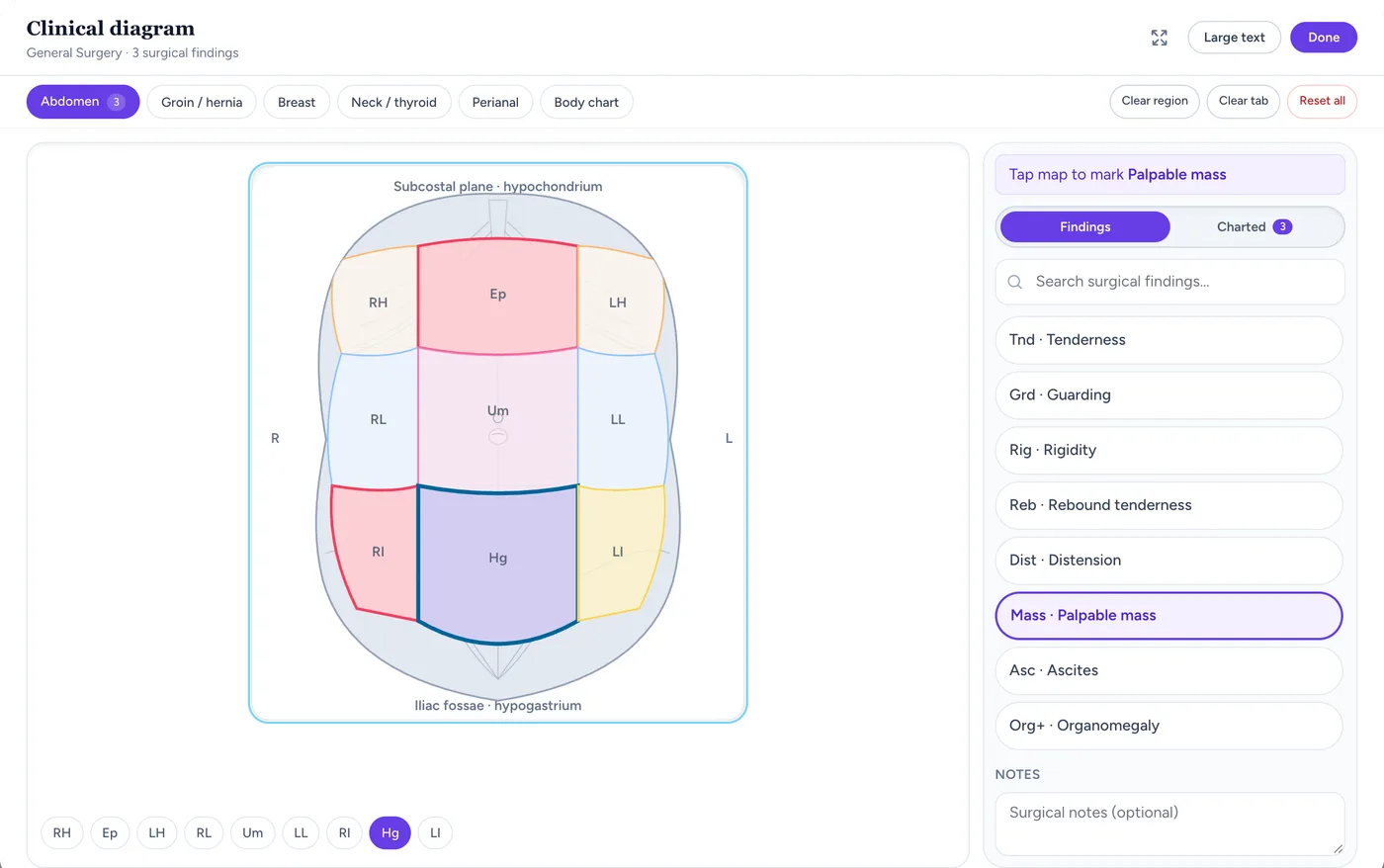
The surgical abdomen map
Nine-quadrant abdomen map with regional findings marked, ready for pre-op assessment and post-op tracking.Screen from the Medabha consult room, shown with demo data.Surgical maps for pre-op and post-op visits
Mark findings where they are instead of describing them, and see the last visit underneath.
Abdomen in nine regions
Tenderness, guarding, rigidity, rebound, distension, a mass, organomegaly, ascites or a stoma, marked in the region where you found it.
Groin and hernia
Reducible, irreducible or strangulated hernia, cough impulse and scrotal extension.
Breast, neck and perianal
Separate maps for breast lumps, neck and thyroid swellings, and perianal findings.
Last visit underneath
The previous visit's markings show faintly, so wound and swelling changes are visible at a glance.
Post-op follow-ups without the paper trail
Review visits are short. The chart, the photos and the last note should be there when the patient walks in.
A Wound / post-op template
Add the Wound / post-op note template from the scribe template catalogue, or write your own format.
Wound photos on the visit
Upload photos from your phone to the consultation so each dressing review has its own image. JPEG, PNG, WebP, GIF and PDF are accepted, up to 20 MB per file.
Investigations from a list
Order USG abdomen, LFT, FNAC, mammography and the routine pre-op tests, and attach the reports when they arrive.
Review reminders
Set the next review date and a WhatsApp reminder goes to the patient before it. (Needs reminders turned on in clinic settings.)
Consent and patient photos under Indian regulation
The 2002 MCI regulations still applied by the NMC (Indian Medical Council (Professional Conduct, Etiquette and Ethics) Regulations, 2002) set rules on consent and patient photographs. This is a general guide, not legal advice.
Clause 7.16: Consent before operation
Written consent should be taken before an operation, from the patient or from a parent or guardian for a minor.
Clause 7.17: Patient photographs
Do not publish photographs or case reports in a way that identifies the patient without their permission. Take and share photos only with the patient's agreement.
Clause 1.4.1: Registration number
Your registration number is required on prescriptions, certificates and money receipts.
Dictate the note after the procedure
Between patients, say the summary out loud and let the AI scribe draft it. (Professional plan only.)
Doctor-only dictation
Dictation mode records only you, separate from the in-room consult mode used with the patient present.
22 Indian languages
The scribe auto-detects all 22 scheduled Indian languages plus English. Notes are written in English.
You review every draft
Nothing reaches the chart until you edit and apply it.
Discharge advice, prescriptions and fees
The patient leaves with instructions in writing and in your voice.
Picture Rx and wound-care clip
Send the prescription on WhatsApp with a short voice clip on dressing and warning signs.
Procedure fees on the bill
Add consultation and minor-procedure charges as fee lines and collect by UPI or cash.
A receptionist login
The front desk handles appointments and billing without opening your clinical notes.
What Medabha doesn't do (yet)
Medabha is OPD software for solo doctors and small clinics. These features are not available today.
No thorax or pelvic map
The surgical maps are abdomen (9 regions), groin and hernia, breast, neck and thyroid, and perianal. A thorax map and a pelvic map are not available.
Photo compare is for lab values only
The side-by-side compare feature works for lab test values across visits. Wound photos are not shown side by side; open each visit to see its photos.
No OT or ward workflow
Medabha covers the OPD: pre-op assessment, post-op follow-ups, prescriptions and billing. OT scheduling, wards, admissions and discharge summaries need a hospital information system.
No consent form in the app
Operative consent is taken on paper at the hospital where you operate, or you attach a scanned copy to the visit. No consent form is built into the software.
Built for the General Surgery exam
Abdomen (nine regions), groin and hernia, breast, perianal and neck/thyroid maps for pre-op assessment and post-op follow-up.
One-click problem packs
Pre-fills common findings and medicines for general surgery visits. You review and edit before signing — nothing reaches the chart unapproved.
Why general surgery clinics use Medabha
Wound tracking without paper sketches
Mark incision sites, drains, and wound findings on the correct regional map, then compare against the last dressing change with a ghost overlay.
Dictate the operative note
Doctor-only dictation mode drafts a structured note from your spoken summary — useful right after a procedure, before the next patient.
Discharge advice on WhatsApp
Share a Picture Rx plus a short voice clip covering wound care and follow-up so the family has something to replay at home.
General Surgery clinic software questions
Which regions does the surgical diagram system cover?
The abdomen in nine regions, the groin and hernia, the breast, the perianal region and the neck and thyroid each have a dedicated map for marking findings, incisions and wounds.
Can I track a wound across follow-up visits?
Yes. The previous visit's markings show faintly over today's diagram, and you can attach a wound photo to each visit, so healing is visible without redrawing the chart.
Can I dictate an operative note instead of recording a consult?
Yes. Dictation mode captures only your voice and drafts a note from it, separate from the in-room consult mode used with the patient present. (Professional plan only.)
Can I attach wound or lesion photos?
Yes. Upload JPEG, PNG, WebP, GIF or PDF files to the consultation from your phone or computer (up to 20 MB per file), and they stay with that visit.
Is there an OT or surgery scheduling module?
No. Medabha covers the OPD side: pre-op assessment, post-op follow-ups, prescriptions and billing. OT scheduling, wards and in-patient care need a hospital information system.
Which investigations can I order?
USG abdomen, LFT, FNAC and mammography are in the list with the routine OPD tests, and reports can be attached to the visit when they arrive.
Other specialties on Medabha
Ready to see Medabha for general surgery?
Book a 15-minute walkthrough with your own cases in mind, or start the 14-day free trial. After it, the Free plan stays free: 100 visits a month, no card.
Explore Medabha by what you need
Each page covers one part of running a clinic, with what it does and what it does not.
Guides for clinics
Plain-language reads on EMR software, prescriptions and AI documentation.
What Should an EMR Software Have? A 15-Point Checklist for Clinics
Feature lists are long and most of it will not matter. Use this checklist to judge whether an EMR will actually work in your OPD.
6 min readBasicsWhat is EMR Software? A Plain-Language Guide for Indian Doctors
EMR software is the digital version of your paper chart. Here is what it stores, how it works in a busy OPD, and what to look for before you buy.
7 min readBasicsPaper vs Digital Medical Records: Which is Better for Your Clinic?
Paper still works, and going digital is not free. Here is an honest comparison of cost, speed, safety and continuity, and how to move without disruption.
8 min read