DOCTOR SOFTWARE
Doctor chamber software built around the consult, not the office
One screen for the consultation, the prescription and the follow-up, for a doctor who runs a private practice with little or no staff.
- One doctor, one clinic, with an optional receptionist
- From walk-in to signed prescription in one screen
- Not a marketplace and no commission on appointments
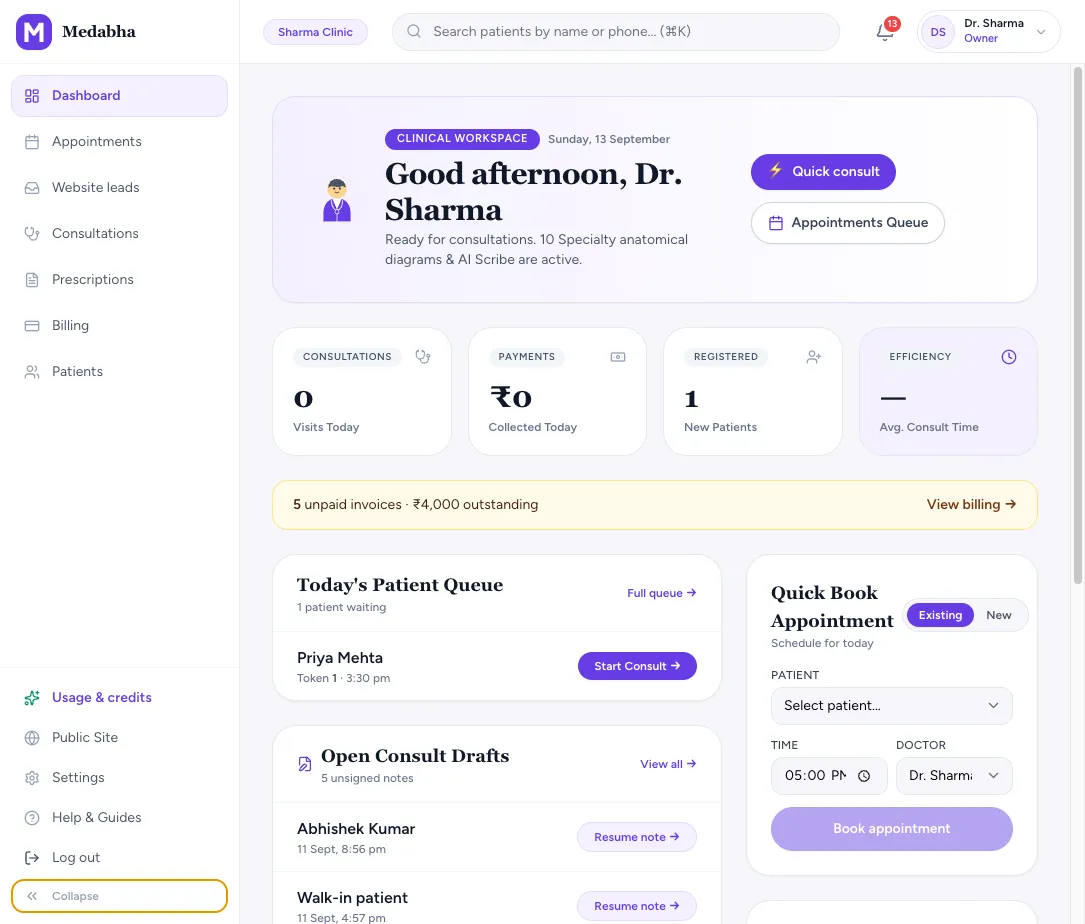
What a day looks like
The product is organised around the order in which a doctor's day actually happens.
Morning: open the queue
See today's scheduled patients with token numbers, and add walk-ins with just a name and phone number.
Consult: one screen
History, allergies, vitals, notes, charts and prescription sit together, and patient details save as you go.
After each visit: sign and send
Sign the visit and the prescription can leave on WhatsApp as a picture with your letterhead.
Evening: nothing left to write
With an AI scribe drafting notes during the visit, the pile that used to wait until night is much smaller.
Made for one doctor with little support
Many products assume a hospital. This one assumes a doctor, a phone and a busy OPD.
Quick registration
Create a patient inline from the walk-in queue and start the consultation straight away.
Chambers in more than one place
Set several locations with their own weekly hours, so patients book the right chamber and slot.
A receptionist, if you have one
Add a receptionist who can register patients and manage the queue without seeing your clinical notes.
Works on the devices you have
Use it in a browser on a laptop, or install it on a phone as an app for recording and quick checks.
The rest of the practice, without a second tool
Everything around the consultation is in the same place.
Billing and UPI
Record fees, mark payments and collect by UPI against the visit.
A clinic website
Publish your own site where patients see your hours and can pick an open slot.
Follow-up reminders
Send appointment and follow-up reminders on WhatsApp so fewer patients quietly drop out.
Insights when you want them
A periodic view of footfall, new versus returning patients and no-shows, kept apart from the daily screen.
Getting started takes an afternoon
- 1
Create your account
Sign up as a doctor. Your clinic name is optional and defaults to your own.
- 2
Set your letterhead and specialty
Add your registration details, choose your specialty and set your usual fees.
- 3
See your first patient
Register a walk-in and run a full consultation, with or without the scribe.
- 4
Turn on what you need
Add WhatsApp sending, your clinic website and reminders when you are ready.
Compared with what many solo doctors use today
| Comparison | Notebook, Excel and chat apps | A marketplace app | Medabha |
|---|---|---|---|
| Patient records | Scattered across books and phones | Held by the platform, listed beside other doctors | One chart per patient, owned by your clinic |
| Prescriptions | Handwritten or photographed | Inside the app | Signed, with your letterhead, sent on WhatsApp |
| Cost model | Free but time-consuming | Often a commission or listing fee | One software fee, no commission |
| Your patients | Yours | Shown alongside other doctors | Yours, and never advertised to |
Who this is not for
- Medabha is built for one doctor per clinic with an optional receptionist. It is not a multi-doctor group or a hospital information system.
- It is early-access software. Keep your own independent records while you evaluate it.
Frequently asked questions
Is this software for a single doctor?
Yes. Each clinic has one doctor and can add an optional receptionist. That is what keeps the product simple, but it also means it is not designed for a multi-doctor group practice.
I see patients in two chambers. Does it work for me?
Yes. You can add several locations, each with its own weekly hours, and patients booking through your clinic website choose a location and an open slot.
How much time will it save me?
It depends on how you work today. The best way to find out is to time a week of documentation before and after using the scribe. Our guide on saving time with AI documentation shows how.
Do my patients need to install an app?
No. Prescriptions and advice clips open in the phone's browser from a WhatsApp link.
Can I try it before I pay?
Yes, there is a 14-day free trial with no credit card. To see it on your own workflow first, you can also book a short demo.
Keep exploring
Clinic management software
Clinic management software for Indian clinics: appointments, walk-in queue, UPI billing, AI-drafted notes and prescriptions on WhatsApp. 14-day free trial.
Learn moreAI medical scribe
Ambient AI medical scribe that understands Hindi, Bengali, Tamil and other Indian languages, even mixed with English. Drafts SOAP notes for you to review.
Learn moreMedical practice management software
Practice management software to run your clinic as a business: patient growth, returns, no-shows, revenue, outstanding fees and who has access.
Learn moreSee it for your specialty
Read the guides behind this
Plain-language articles that explain the ideas on this page in more depth.
Doctor Chamber Management Software: What Indian Chambers Need
Doctor chamber management software should fit a solo or evening chamber, not a hospital. Here is what to keep, what to skip, and how to choose.
7 min readGetting StartedHow Doctors Can Digitize Their Clinic: A Step-by-Step Plan
Going paperless does not mean scanning every old file. Here is a practical order of steps that lets a busy clinic go digital without slowing the OPD.
7 min readBuying GuidesBest Clinic Management Software for Small Clinics in India (2026): How to Choose
There is no single best clinic software. There is the best fit for your specialty, team and budget. Here is how to shortlist and decide.
6 min readGuidesClinic Website for Doctors: What Your Patients Actually Need
A clinic website for doctors does not need to be fancy. Here is what patients look for, what to skip, and how to keep it honest and easy to update.
7 min readSee it on your own workflow
Start the 14-day free trial, or book a short walkthrough with your own patients in mind.