MEDICAL PRACTICE MANAGEMENT
Medical practice management software: understand and run your clinic as a business
Clinic management runs today's clinic. Practice management tells you how the clinic is doing: patient growth, returning patients, no-shows, revenue, costs and who can see what.
- Insights on footfall, returning patients and no-shows
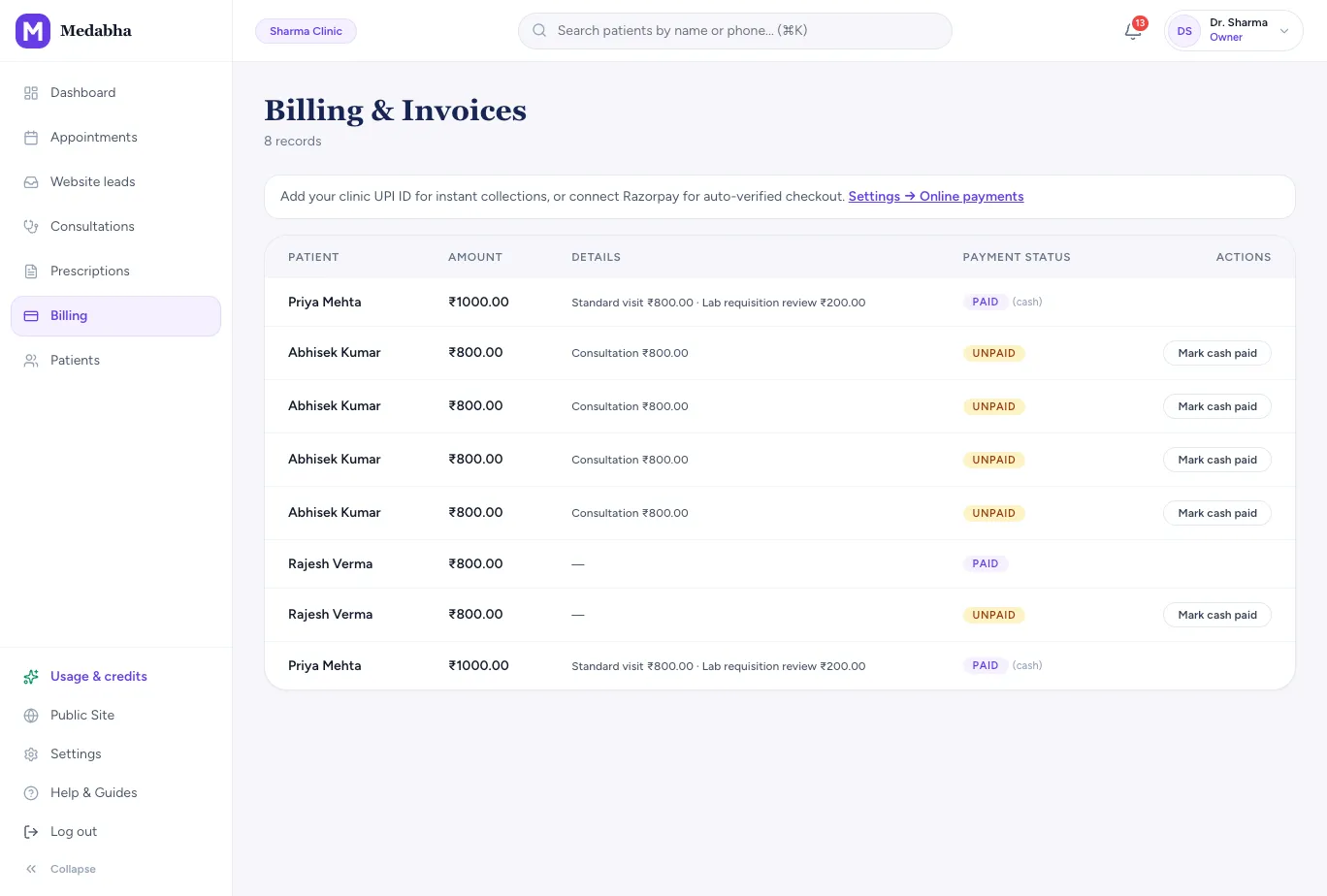
- Billing, UPI collection and outstanding amounts
- Roles, sign-in history and a clinic website you own
See how the practice is doing
A periodic view of the practice is kept apart from the daily dashboard, because it is a question you ask monthly, not between patients.
Patient growth
A six-month trend of new patients, plus gender and age mix.
Footfall
How many people you saw, and when.
New versus returning
The share of patients who come back, and a return rate over 60 days.
No-shows
A no-show rate for the last 30 days, with appointments you can mark as no-show.
Revenue trend
With billing on, a revenue trend alongside patient numbers.
Time saved by the scribe
A directional estimate of documentation time saved each month. It is an estimate, not billed usage.
Get paid and keep costs predictable
A solo practice feels every unpaid invoice and every surprise bill.
Outstanding at a glance
The dashboard shows unpaid invoices and the amount outstanding.
One software fee
No per-appointment commission and no listing fee.
Usage you can see
A usage page shows what AI scribe and messaging your clinic has used against its plan.
Turn the numbers into decisions
Each number points to something you can change. The tools to change it live in the daily clinic workflow.
Return rate falling
Check that follow-up dates are set on prescriptions and that WhatsApp follow-up reminders are on.
No-shows rising
Make sure WhatsApp appointment reminders are on. They include a second nudge a few hours before the visit. Mark no-shows so the rate stays honest.
Few new patients
Publish your clinic website with online booking, so patients who search for you can book a slot.
Busy and quiet days
Footfall by day shows when to add chamber hours and when to cut them.
Control who sees what
Patient information is sensitive, and practice owners are accountable for it.
Owner, doctor and reception roles
Each person has their own login and the access that role needs.
Sign-in history
See who signed in, when, from where and on web or app, for 180 days.
Clinic-level isolation
Records are scoped to your clinic so another practice cannot open your patients.
Your data, on request
The owner can download patient and visit records from Settings, and can delete the clinic from there.
A monthly rhythm for the practice owner
- 1
Review Insights
Check footfall, returns and no-shows for the month.
- 2
Chase what is unpaid
Open the outstanding invoices and follow up.
- 3
Check access
Review sign-ins and remove anyone who has left.
- 4
Update your website
Refresh services and hours so bookings match reality.
Running the business side with and without connected data
| Comparison | Memory and notebooks | Spreadsheets you maintain | Medabha |
|---|---|---|---|
| How many new patients this month | A guess | Counted by hand | Shown as a six-month trend |
| Do patients return | Impression | A pivot table | A return rate |
| No-shows | Noticed when the chair is empty | Logged by hand | A rate over 30 days |
| Who has access | Whoever holds the register | Not tracked | Roles and a 180-day sign-in history |
Scope, stated plainly
- Medabha supports one doctor per clinic with an optional receptionist. It is not designed for multi-doctor groups, multi-branch chains or hospitals.
- Insights are practice-level summaries, not accounting reports. GST line-item invoicing is not built yet.
- The scribe time-saved figure is an estimate to give you a feel for the month, not a measurement.
Frequently asked questions
What is medical practice management software?
It covers the business side of running a clinic: scheduling, billing, patient communication, reporting and access control. In Medabha it sits on the same system as the clinical record, so the numbers come from real visits.
Does it support multiple doctors?
No. Each clinic has one doctor and an optional receptionist. If you need a multi-doctor group system, Medabha is not the right fit today.
What do the Insights show?
Patient mix by age and gender, a six-month patient trend, footfall, new versus returning patients, a return rate, a no-show rate and, with billing on, a revenue trend.
How is this different from clinic management software?
Clinic management software runs today's clinic: appointments, the queue, prescriptions, billing entries and reminders. Practice management is about understanding the clinic as a business: growth, returns, no-shows, revenue and access. Our clinic management software page covers the daily side.
How do I get started?
Start the 14-day free trial, or book a short demo and we will walk through it with your own workflow.
Keep exploring
Clinic management software
Clinic management software for Indian clinics: appointments, walk-in queue, UPI billing, AI-drafted notes and prescriptions on WhatsApp. 14-day free trial.
Learn moreDoctor software
Doctor chamber software for a solo practice: fast consults, AI-drafted notes, WhatsApp prescriptions, billing and a clinic website.
Learn moreAI medical scribe
Ambient AI medical scribe that understands Hindi, Bengali, Tamil and other Indian languages, even mixed with English. Drafts SOAP notes for you to review.
Learn moreSee it for your specialty
Read the guides behind this
Plain-language articles that explain the ideas on this page in more depth.
EMR vs Clinic Practice Management Software for Indian Clinics
EMR, clinic practice management software and a hospital HIS do different jobs. Here is what each one covers, what a small Indian OPD should buy first, and where Medabha fits.
9 min readBuying GuidesBest Clinic Management Software for Small Clinics in India (2026): How to Choose
There is no single best clinic software. There is the best fit for your specialty, team and budget. Here is how to shortlist and decide.
6 min readGetting StartedHow Doctors Can Digitize Their Clinic: A Step-by-Step Plan
Going paperless does not mean scanning every old file. Here is a practical order of steps that lets a busy clinic go digital without slowing the OPD.
7 min readBasicsPaper vs Digital Medical Records: Which is Better for Your Clinic?
Paper still works, and going digital is not free. Here is an honest comparison of cost, speed, safety and continuity, and how to move without disruption.
6 min readSee it on your own workflow
Start the 14-day free trial, or book a short walkthrough with your own patients in mind.